How CRED Email Enrichment Works - Smart Enrich reducing bounce rate to <5%
Last updated: June 8, 2026
The short version
When you ask CRED to find someone's email, we don't rely on a single data vendor. We run your request through a waterfall of best-in-class providers, one after another, and we independently validate every email we find before we hand it to you. The result is split into two clearly-labelled buckets — verified and unverified — so you always know exactly how much to trust an address before you hit send.
In our internal tests we run weekly:
SmartEnrich ON = ~3% bounce rate
SmartEnrich OFF = 26.8% bounce rate
Smart Enrich cuts the bounce rate by ~88% (26.8% → 3.1%), taking deliverability from ~73% to ~97%.
The reliability comes from two ideas working together:
1. The waterfall — many providers tried in sequence, so coverage is far higher than any one vendor.
2. Smart Enrich — every address any provider returns is put through a live deliverability check, so "verified" genuinely means "we confirmed this mailbox is real."
Part 1 — The enrichment waterfall
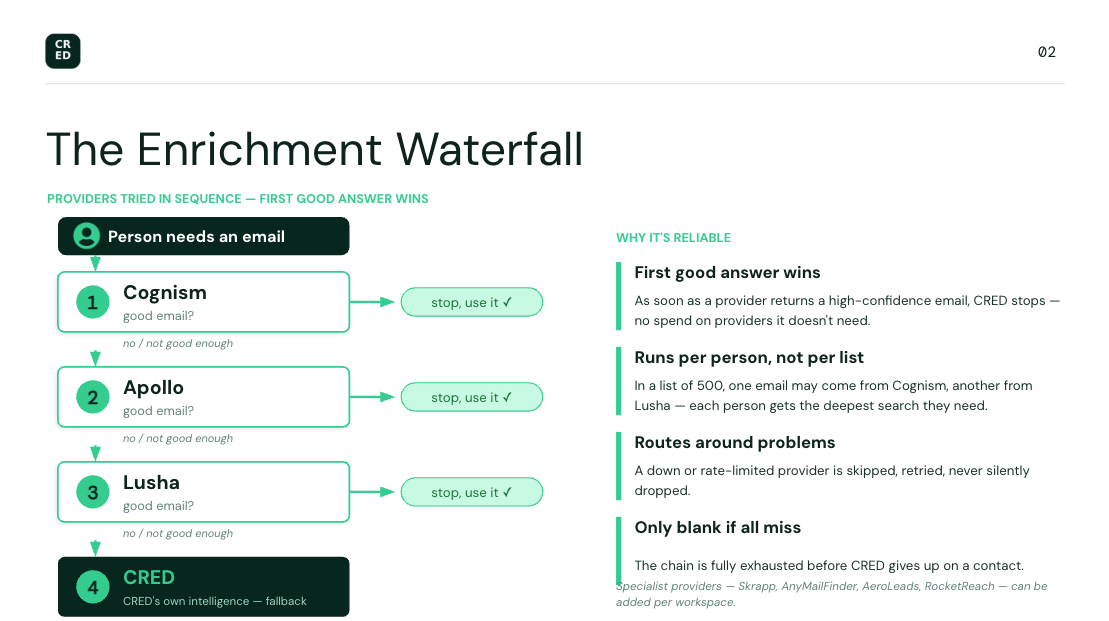
No single data provider has complete, accurate coverage of every professional. Each is strong in different regions, industries, and seniority levels. So instead of betting on one, CRED cascades through several — like water flowing down a series of pools until it finds what it's looking for.
When you request emails for a person (or a whole list), CRED tries providers in a deliberate priority order. The default email chain is:
Three things make this behave the way you'd expect:
First good answer wins. As soon as a provider returns a high-confidence email for a person, CRED stops working on that person. We don't keep spending on providers we don't need.
It runs per person, not per list. In a list of 500 people, one person's email might come from Cognism and another's from Lusha — whatever source actually has them. Everyone gets the deepest search they individually need.
A person is only left blank if every provider misses. We exhaust the chain before giving up.
Why this is reliable:
Coverage. Falling through multiple providers dramatically increases the odds we find someone's email — gaps in one vendor are filled by the next.
It routes around problems automatically. If a provider is temporarily down or has hit its usage limit for the minute, CRED simply skips it and moves to the next one rather than stalling your whole run. Nothing is silently dropped — rate-limited lookups are retried, not abandoned.
It prefers current, real addresses. CRED favors an email at the person's current employer over an old one, and ranks confirmed-deliverable addresses ahead of unconfirmed ones (more on ranking below).
Part 2 — Smart Enrich: validating every result
Finding an email is only half the job. A stale or guessed address that bounces is worse than no address at all — it hurts your sender reputation and wastes your time.
This is what Smart Enrich does: as providers return email addresses, CRED runs each one through a live deliverability check (via ZeroBounce) before deciding whether to trust it. This validation happens against every provider's results, not just one — so the quality bar is the same no matter which vendor an address came from.
How this is priced depends on how you run enrichment. If you use our recommended flow, you pay a single fixed price per contact that already includes the ZeroBounce deliverability check — so there's nothing separate to think about. If you customize the enrichment flow, pricing is calculated differently to match the providers and steps you've chosen.
ZeroBounce is an extra layer — verification still works without it
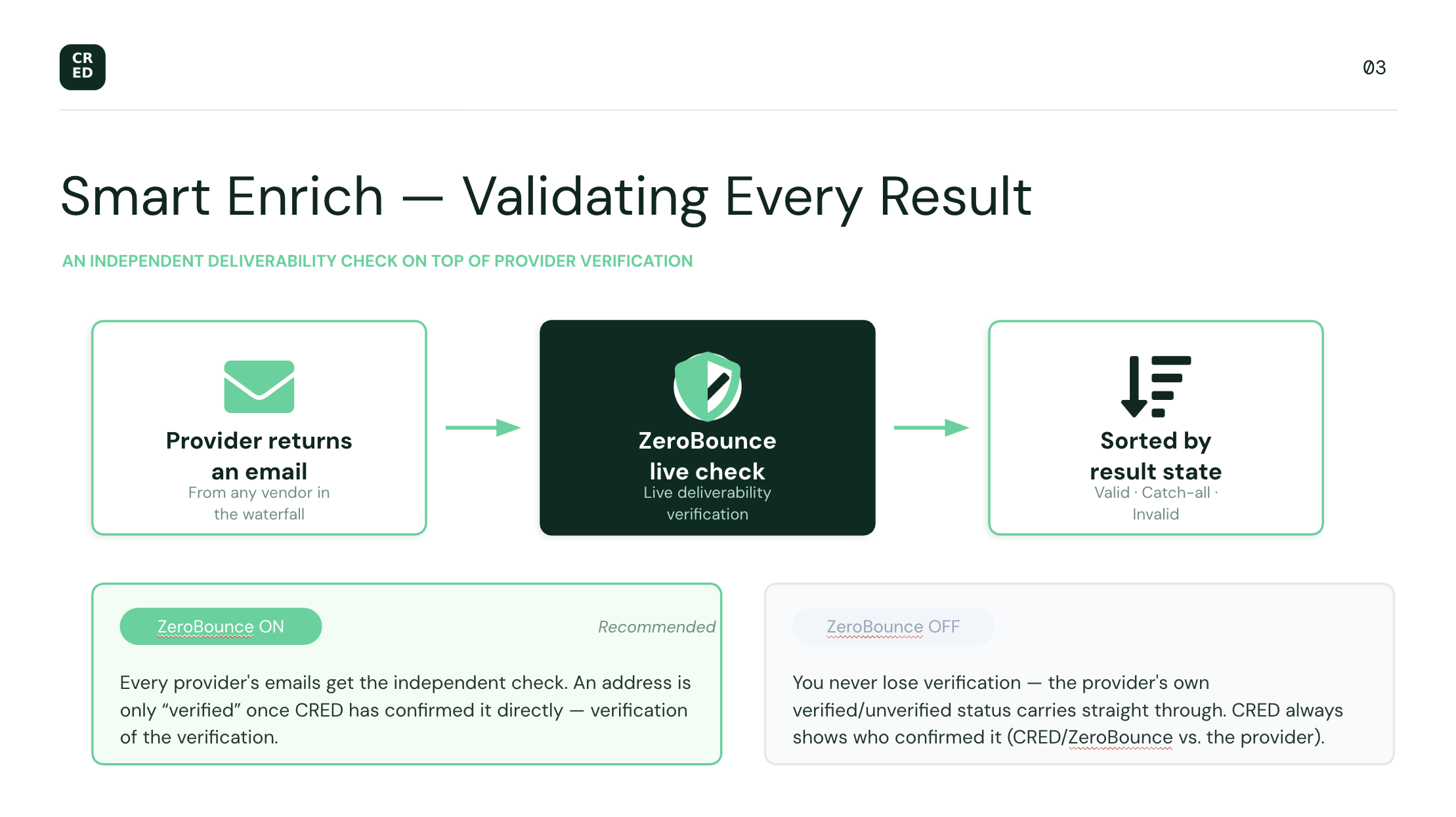
This is a key point about how to think of Smart Enrich. The data providers themselves already tell us whether they consider an email verified. ZeroBounce is a second, independent check layered on top of that provider verification — a "verification of the verification." It's not the only thing standing between you and a bad address.
ZeroBounce validation is controlled by a switch. What happens depends on whether it's on:
ZeroBounce on (recommended): Every provider's emails get the independent deliverability check described above. This is the most rigorous mode — an address is only "verified" once CRED has confirmed it directly.
ZeroBounce off: We don't run the extra check, so the provider's own verification status carries straight through to you. If Apollo returns an address as verified, we show it as verified — by Apollo, and the accuracy of that email is Apollo's to stand behind. If a provider returns it as unverified, it stays unverified.
In other words, you never lose verification by turning ZeroBounce off — you just fall back to trusting the provider's word instead of adding CRED's own confirmation on top. We make the source of the verification visible either way (CRED/ZeroBounce vs. the originating provider), so you always know who confirmed an address, not just that it was confirmed.
Each validated email lands in one of these states:
Status | What it means |
Valid | The mailbox was confirmed to exist and accept mail. This is the gold standard. |
Catch-all | The company's mail server accepts anything sent to its domain, so we can't confirm this specific mailbox is real. Treated as a strong candidate, but not fully confirmed. |
Invalid | The validator confirmed the mailbox is undeliverable (it doesn't exist, or it's a spam-trap / abuse / do-not-mail address). We treat this as a known-bad address — see below. |
Part 3 — How we treat verified vs. unverified emails
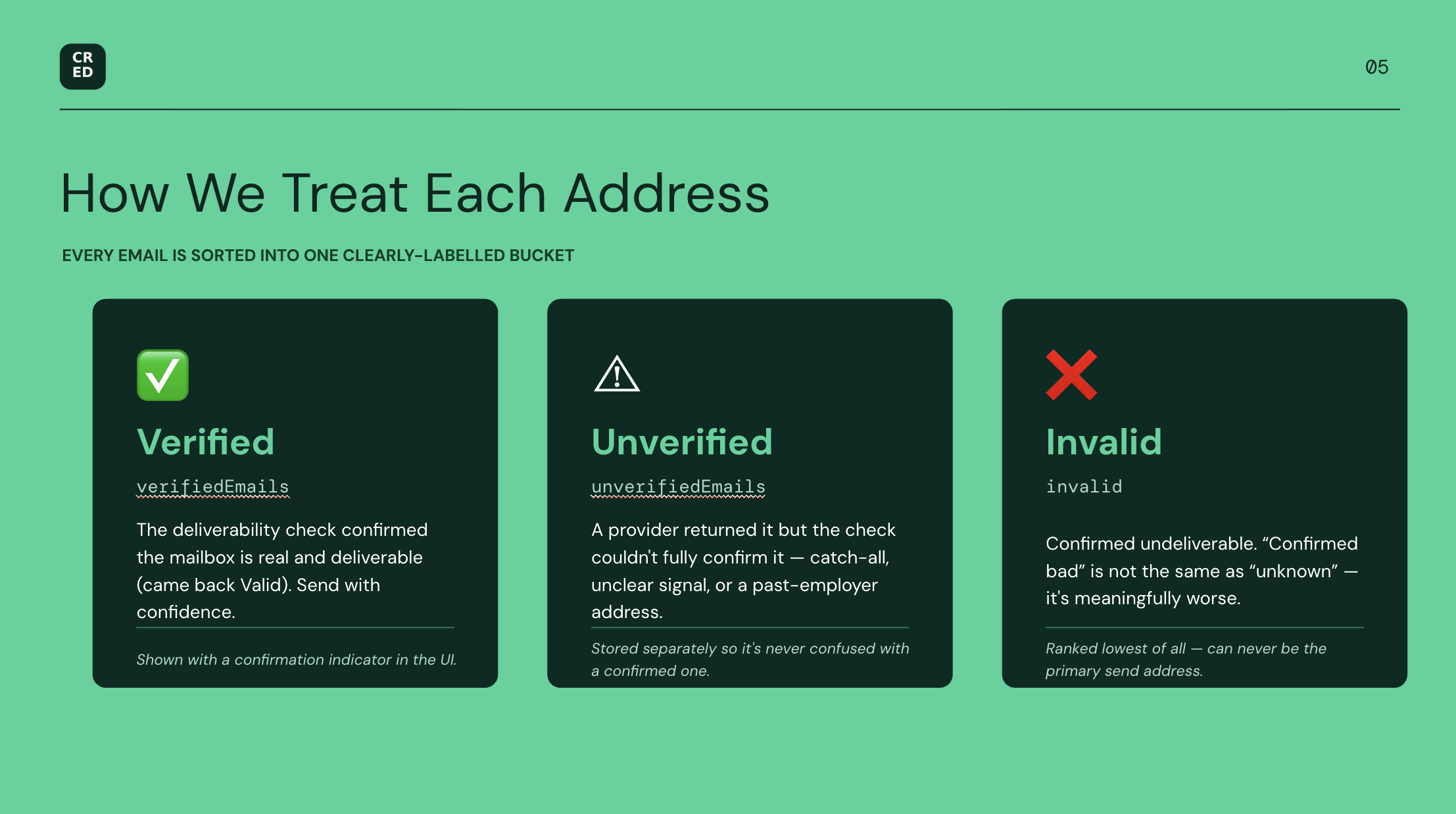
This is the part that matters most day to day. Every email CRED gives you is sorted into one of two buckets:
✅ Verified emails
An email is verified only when the deliverability check confirms the mailbox is real and deliverable — i.e. it came back Valid (not catch-all, not invalid, not unconfirmed). These are the addresses you can send to with confidence.
These are stored in the contact's `verifiedEmails` field and shown with a confirmation indicator in the UI.
⚠ Unverified emails
An email is unverified when a provider returned it but the deliverability check couldn't fully confirm it — for example a catch-all domain (where the mail server accepts anything so we can't isolate the individual mailbox), an address we couldn't get a clear signal on, or an address tied to a past employer rather than the current one. They may well be correct, but we're transparent that we couldn't confirm them.
These are stored separately in `unverifiedEmails` so they're never confused with confirmed addresses.
❌ Invalid emails — "confirmed bad" is not the same as "unknown"
There's an important distinction we now make explicitly. There's a real difference between:
- Unverified / unknown — "we couldn't confirm this works."
- Invalid — "we confirmed this *does not** work."*
These used to be treated the same way — a confirmed-dead mailbox was lumped into the same "unverified" bucket as an address we simply hadn't been able to check. That was misleading: a mailbox ZeroBounce has proven is undeliverable (it doesn't exist, or it's a spam-trap / abuse / do-not-mail address) is meaningfully worse than one we're just unsure about.
So CRED now surfaces Invalid as its own distinct state, and treats it accordingly:
It is ranked lowest of all — below even unverified — so a confirmed-bad address can never be chosen as the primary email we'd send to. It can't accidentally win out over a better candidate.
It's shown with a red warning icon in the UI and labelled `invalid` in CSV exports, so it's unmistakable at a glance.
This protects your sender reputation: CRED actively keeps known-undeliverable addresses out of the spot that matters, rather than quietly leaving them in the pool.
The smart part: "good enough to stop" vs. "keep looking"
This is why the waterfall and validation work together so well. CRED only stops the waterfall for a person once it has a verified, deliverable email at their current employer.
If a provider returns only a catch-all match, CRED keeps it as a candidate but does not stop — because the next provider might return a fully confirmed address at the same company, which is better. We hold out for the best available answer.
A fully verified current-employer email ends the search — we've got the best result, no need to spend on more providers.
So "verified" isn't a label we apply loosely. It's the outcome of an actual deliverability confirmation, and it's the bar the system is actively trying to clear for every contact.
How candidates are ranked
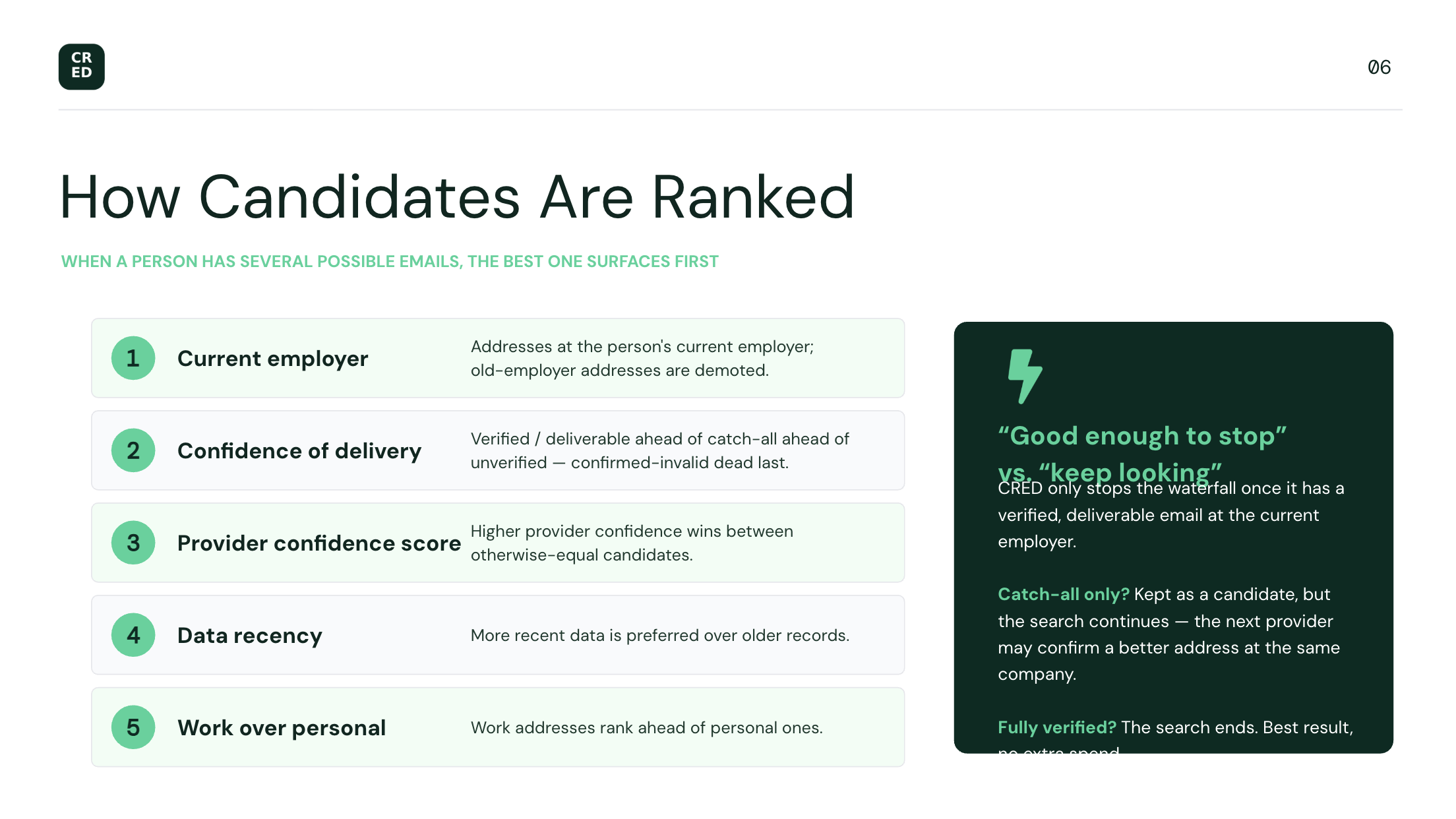
When a person has more than one possible email, CRED ranks them so the best one surfaces first, in roughly this order of preference:
Address at the person's current employer (old-employer addresses are demoted).
By confidence: verified / deliverable ahead of catch-all ahead of unverified / unknown, with confirmed-invalid addresses dead last so they can never be chosen.
Higher provider confidence score.
More recent data.
Work addresses ahead of personal.
Putting it together — why you can trust the output
What CRED does | Why it makes the result reliable |
Tries multiple providers in a waterfall | Far higher coverage than any single vendor |
Runs per person | Everyone gets the depth of search they individually need |
Skips failing / rate-limited providers automatically | A bad vendor day doesn't stall or break your run |
Adds an independent deliverability check on top of provider verification (Smart Enrich / ZeroBounce) | "Verified" is confirmed twice when it's on — and you can switch it off to trust the provider directly |
Always shows who verified an address (ZeroBounce vs. the provider) | You know the source of every verification, not just that it happened |
Splits results into verified / unverified / invalid | You always know how much to trust each address |
Ranks confirmed-bad (invalid) addresses dead last | A known-undeliverable mailbox can never be your primary send address — protects sender reputation |
Holds out for a confirmed current-employer email | You get the best available answer, not just the first one |
Favors current employer + deliverable + recent in ranking | The top result is the one most likely to land |
The bottom line: when CRED marks an email verified, it has been confirmed — either by CRED's own ZeroBounce deliverability check (when that layer is on) or by the provider that supplied it (when it's off), and we always tell you which. When it's unverified, we're being upfront that we found it but couldn't confirm it. And when we've confirmed an address is dead, we flag it invalid and keep it out of the way so it never lands in front of you as a usable send. You're never guessing about the quality of what you're about to send to.